

Release Notes

Dec 4, 2024
- New Features
- Vulnerability Risk Score Override
- Customers have the ability to modify risk scores at the Vulnerability level.
- First navigate to the platform settings page and select "Risk Score Modification" from the settings menu.
- Enable the "Allow Risk Score Modification" slider.
- Click the "Plus" icon to add your authorized override categories.
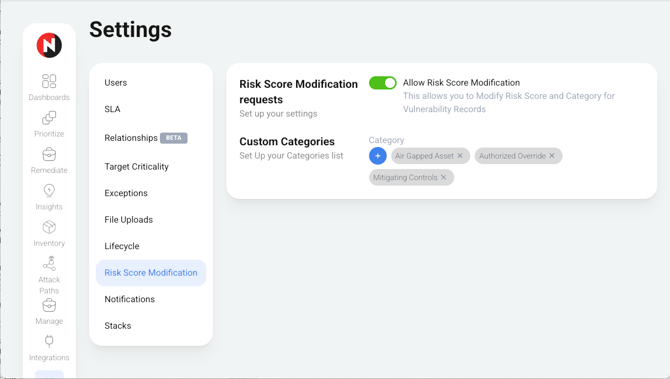
- First navigate to the platform settings page and select "Risk Score Modification" from the settings menu.
- Customers have the ability to modify risk scores at the Vulnerability level.
- Vulnerability Risk Score Override
-
-
-
- Next, use the Prioritize Page and query tool to locate the specific vulnerability you wish to modify. Ensure you select "Vulns" from the Group by section.
- Click on the eye icon to open the vulnerability then click on the "Modify Vuln Record" Button to open the risk modification dialog box
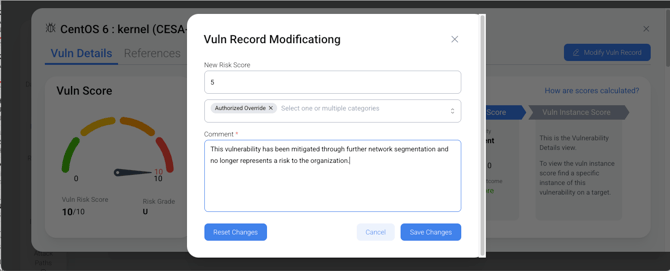
- Select and add one or more modification categories.
- Add supporting comments (Required) then save your changes.
- A "Modified" icon will now appear on all vuln instances under that vulnerability. You can mouse over the icon to view the supporting comments.
-
-