


Jun 11, 2025
- New Features
- Group by Assets
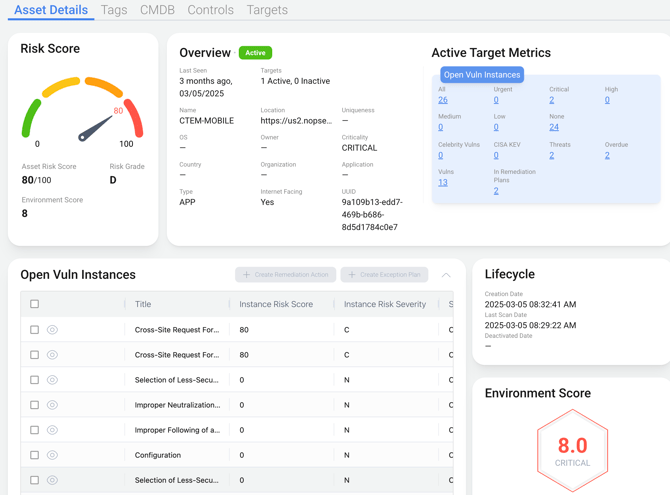
- On the Prioritize page, a group by asset view has been implemented. This provides a unified view of assets, regardless of whether they originate from single or multiple targets.
- The group by target view will eventually be retired from the prioritized page.
- On the Prioritize page, a group by asset view has been implemented. This provides a unified view of assets, regardless of whether they originate from single or multiple targets.
- Instance Statistics
- To gain a clearer understanding of the data transformation process from an integration to the NopSec platform, a Sankey diagram illustrating the data flow over the past 30 days has been developed.
- This diagram can be accessed by navigating to the integrations page, selecting the integration details, and then clicking on the statistics tab.
- Stacks
- Stacks offer a means to categorize targets.
- This initial release of Stacks enables the definition of a stack and the visualization of aggregated statistics, including Risk Grade, Risk Score trends, Risk Distribution, Critical Vulnerabilities per Target, Target count, and Owner.
- To establish a stack, navigate to the Assets section and select Stacks, leading to the Stacks page. Subsequently, select the "Create New Stack" button.
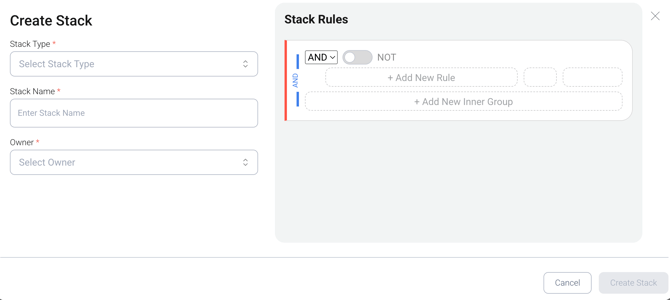
- Within the dialogue box, provide the Stack Type, Stack Name, and Owner.
- Note: Stack Types are configured in the Settings page under Stacks.
- Stack Rules function as a restricted query manager for defining stacks, limited to tags, target, and team fields.
- Select "Create a Stack".

- NOTE: That data data for Risk Score trends and Risk Distribution will not be immediately available.
- Stacks functionality will expanded, including use in dashboards, prioritization, and insights. Feedback regarding desired stack applications can be submitted as a feature request.
- Group by Assets
- New integrations
- Microsoft Defender
- Bitsight