![nopsec-full-logo-white.png]](https://support.nopsec.com/hs-fs/hubfs/Images/Logos/NopSec%20Logos/nopsec-full-logo-white.png?height=40&name=nopsec-full-logo-white.png)
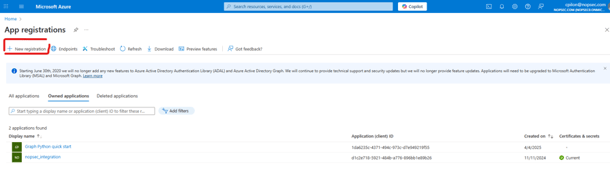
1. To set up a Microsoft Defender integration, log in to Azure and create a new app registration.
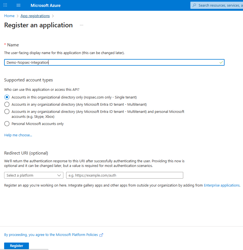
2. Give it a name and registry.
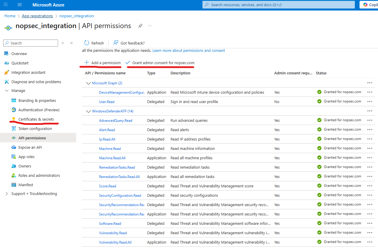
3. Next, note the client_id and tenant_id for future use. Then, go to API permissions.
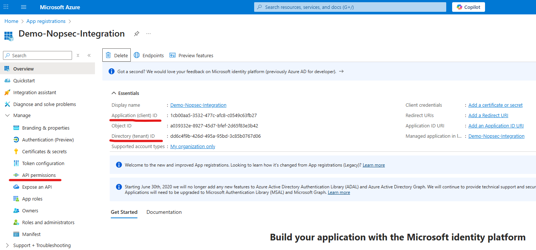
4. In API permissions, assign the necessary permissions to the application. Then, go to Certificates & Secrets.
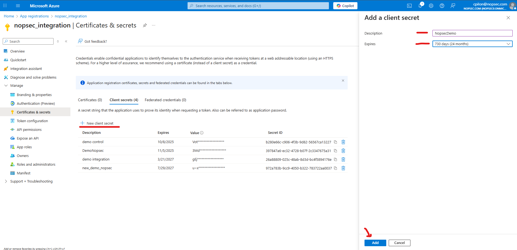
5. Create a new Client Secret.
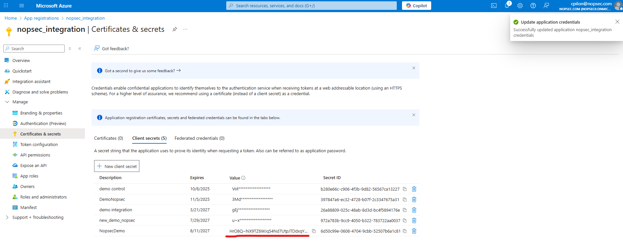
6. Note the new secret value, as you will need it.
Finally, create a new Nopse Microsoft Defender integration and enter the following:
-
Connection Name: Friendly name for the connection
-
Connection Platform: Select your platform region from the dropdown
-
Client ID: ID generated when registering the Nopsec application
-
Tenant ID: ID generated when registering the Nopsec application
-
Secret Key: API key created in the previous steps